Open the Theme Press Designer and navigate to your chosen layoutUse the "." hotkey to toggle open the Designer and then navigate as follows:
| HTML Wrap |
|---|
| tag | span |
|---|
| class | product-navigation |
|---|
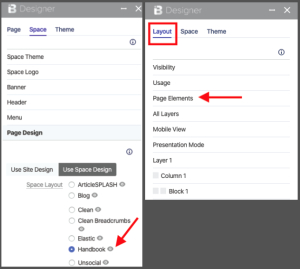
| Theme Press Designer → Space Tab → Page Design (click to expand) |
Locate the selected Page Design, then click on the eye icon next to the titleNote the "Page" tab in the Theme Press Designer, will now change to "Layout" | HTML Wrap |
|---|
| 
|
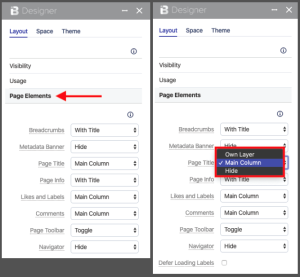
In the Layout tab, click the Page Elements expanderSelect desired control option for each Page ElementOptions include toggling the element on and off, as well as (sometimes) positioning the element | HTML Wrap |
|---|
| 
|
|