Add a block (or 2, 3 etc.) to your page.The designer accordion will open, displaying multiple expanders.
| HTML Wrap |
|---|
| tag | span |
|---|
| class | product-navigation |
|---|
| Theme Press Designer → Page Tab → (Column 1) |
Click on the 'Handling' expander.From the 'Tabbed Blocks' dropdown, select either 'tabs' or 'expanders'.Choose the blank option if you want to remove any styling. | HTML Wrap |
|---|
| 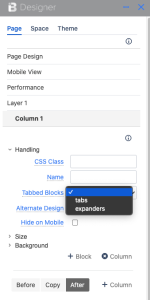 Image Added Image Added
|
|