Open the Theme Press Designer and navigate to your chosen layout
| HTML Wrap |
|---|
| tag | span |
|---|
| class | product-navigation |
|---|
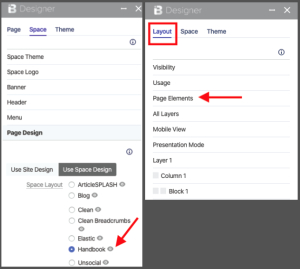
| Theme Press Designer → Space Tab → Page Design |
Click through to the layout page, by clicking on the eye icon next to the titleNote the "Page" tab in the Theme Press Designer, will now change to "Layout" | HTML Wrap |
|---|
| 
|
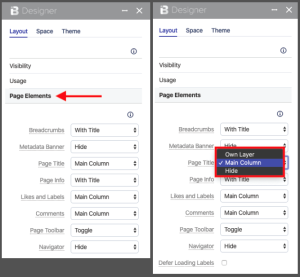
In the Layout tab, click the Page Elements expanderSelect desired control option for each Page ElementOptions include toggling the element on and off, as well as (sometimes) positioning the element | HTML Wrap |
|---|
| 
|
|