Including licensed font files in your theme.

You may have a set of font files licensed for your organization for web use. In order to add them to your theme's font families, you must first add them to your theme.

copied over: 

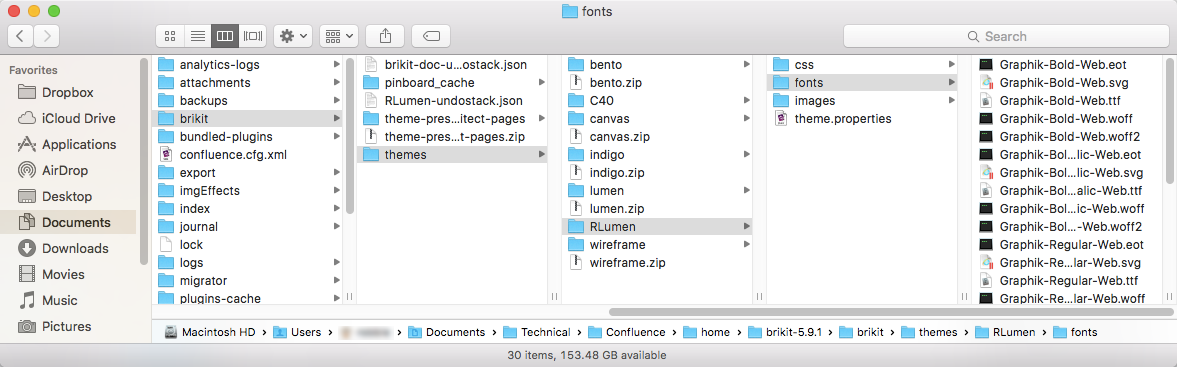
Add fonts Folder to Confluence home Directory

  1. From your Confluence home directory navigate to brikit/themes.

  2. Select the folder that matches the appropriate theme.
  3. If not already there, add a fonts folder.
  4. Within the fonts folder, add your font files:
    • .eot
    • .svg
    • .ttf
    • .woff


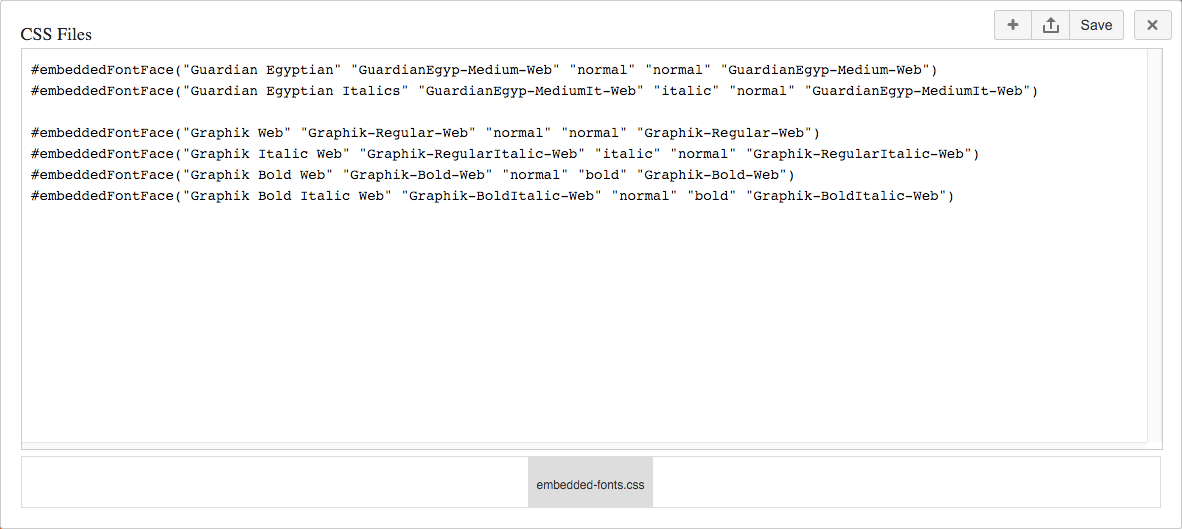
Add Custom CSS to Your Theme

Your packaged web-font files should contain the following information:

  • font-family name
  • font style
  • font weight
  • font ID

 You can find the font ID in the .svg file.

The name of your font file (minus the extension) is the font's key. Once you have this information, add the following CSS to your theme.

#embeddedFontFace("<font-family name>" "<font key>" "<font style>" "<font weight>" "<font id>")
#embeddedFontFace("Graphik Bold Web" "Graphik-Bold-Web" "normal" "bold" "Graphik-Bold-Web")

If using:

  1. Replace me with something to note about this how-to entry that falls outside the scope of all other sections; and
  2. Add the tight-bottom class to the Steps block above to narrow the gap between the two blocks.

If using:

  1. Replace me with something to note about this how-to entry that falls outside the scope of all other sections; and
  2. Add the tight-bottom class to the next visible/non-collapsed block above this one to narrow the gap between the two blocks.

If using:

  1. Replace me with something to note about this how-to entry that falls outside the scope of all other sections; and
  2. Add the tight-bottom class to the next visible/non-collapsed block above this one to narrow the gap between the two blocks.

If using:

  1. Replace me with something to note about this how-to entry that falls outside the scope of all other sections; and
  2. Add the tight-bottom class to the next visible/non-collapsed block above this one to narrow the gap between the two blocks.
  • Replace me with a link
  • Replace me with a link
  • Aim for 4 or fewer related links.  If we need more, that's okay.  Be judicious.  Delete me when you're done.